TopoStats Tutorial : Virtual Environments & Git Branches

Neil Shephard

View these slides…

https://ns-rse.github.io/topostats-tutorial

Introduction

  • TopoStats has undergone significant revision.
  • Versioned releases available via PyPI
  • TopoStats is still undergoing significant development.
  • Also available via GitHub.

Introduction (cont.)

  • User feedback is really, really important.
    • Bugs! When things break.
    • Features - New functionality.
  • Best to capture bugs/issues early in development cycle before PyPI releases

Content

  • Python Virtual Environments (Conda).
  • GitKraken for cloning TopoStats GitHub repository.
  • Installing TopoStats from cloned repository in Virtual Environment.
  • Switching branches and testing.
  • Reporting issues.

Python Virtual Environments

Command Line Environments

  • Command line programmes are searched for in order looking along the paths in $PATH.
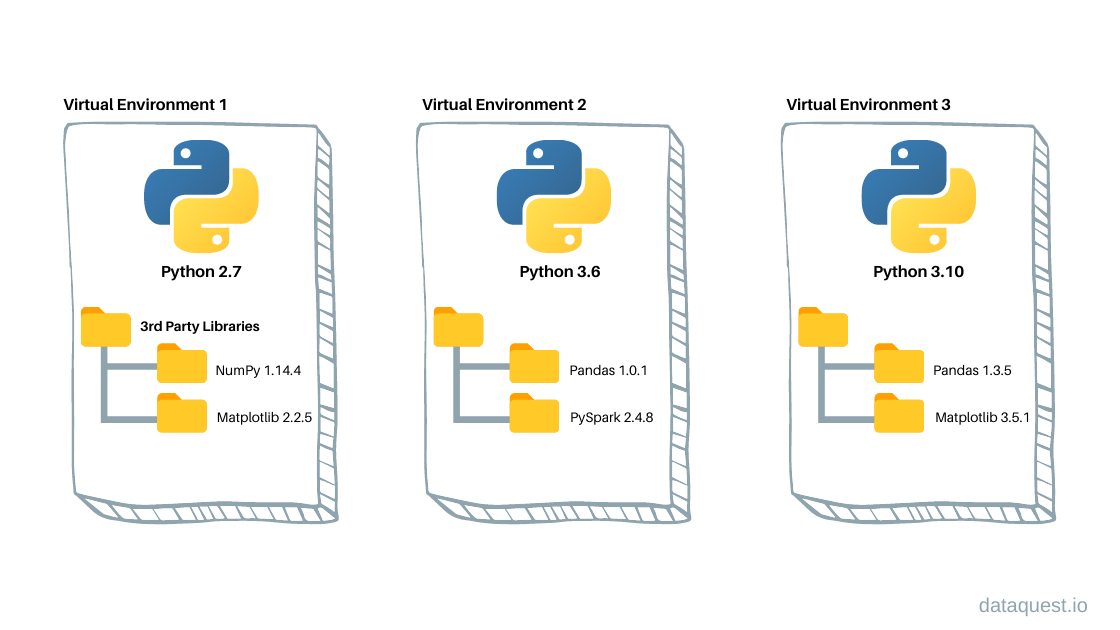
  • A “virtual environment” is an isolated set of commands that take precedence over system commands.
  • You can have multiple virtual environments and switch between them.

Create and Activate Virtual Environment

echo $PATH    # Locations programmes are searched for BEFORE
which python  # Show version of python used BEFORE
conda create --name topostats-git python=3.10
conda activate topostats-git
echo $PATH    # Show locations programmes are searched for AFTER
which python  # Show version of python used AFTER

Virtual Environments

Version Control… a digression

Hopefully you have already…

  • Setup GitHub account (https://github.com) using University email address.
  • Downloaded and installed GitKraken using GitHub account associated with University email address.

Comprehensive : Git, GitHub and GitKraken : From Zero to Hero.

Getting Started with Git, GitHub and GitKraken

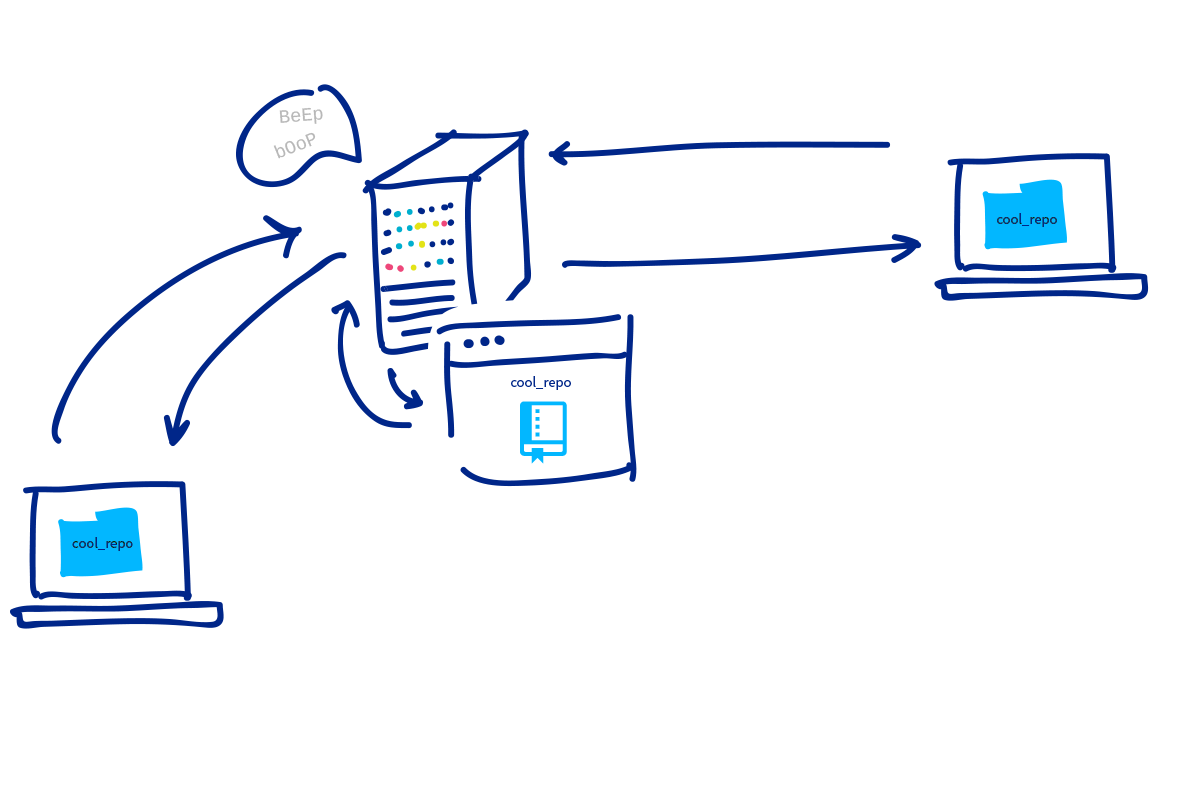
  • Git is a programme that runs on your computer.
  • GitHub is an online service which hosts software projects and facilitates…
    • Distributed software development
    • Tracking bugs/features
    • Project management
  • GitKraken is a client that interfaces to Git and GitHub and communicates between the two.

Git & GitHub

Cloning TopoStats

We’ll now clone TopoStats using GitKraken.

  • File > Clone Repository (Ctrl + N)
  • GitHub.com
  • Select directory to clone to.
  • Under Repository to Clone start typing TopoStats
  • Select TopoStats
  • Clone the repo!

Installing TopoStats under Virtual Environments

We have…

  • Setup and activated a Virtual Environment.
  • Cloned the TopoStats repository.

Next…

  • Install TopoStats from cloned repository.

Installing TopoStats under Virtual Environments

cd ~/tmp/topostats-tutorial/TopoStats
which python
conda activate topostats-git
git status
pip install -e .[notebooks]  # Install additional requirements e.g. .[tests]
run_topostats -h

run_topostats -h

 run_topostats -h
usage: run_topostats [-h] [-c CONFIG_FILE] [--create-config-file CREATE_CONFIG_FILE] [-s SUMMARY_CONFIG] [-b BASE_DIR] [-j CORES] [-l LOG_LEVEL] [-f FILE_EXT]
                     [--channel CHANNEL] [-o OUTPUT_DIR] [--save_plots SAVE_PLOTS] [-m MASK] [-q QUIET] [-v] [-w WARNINGS]

Process AFM images. Additional arguments over-ride those in the configuration file.

options:
  -h, --help            show this help message and exit
  -c CONFIG_FILE, --config_file CONFIG_FILE
                        Path to a YAML configuration file.
  --create-config-file CREATE_CONFIG_FILE
                        Filename to write a sample YAML configuration file to (should end in '.yaml').
  -s SUMMARY_CONFIG, --summary_config SUMMARY_CONFIG
                        Path to a YAML configuration file for summary plots and statistics.
  -b BASE_DIR, --base_dir BASE_DIR
                        Base directory to scan for images.
  -j CORES, --cores CORES
                        Number of CPU cores to use when processing.
  -l LOG_LEVEL, --log_level LOG_LEVEL
                        Logging level to use, default is 'info' for verbose output use 'debug'.
  -f FILE_EXT, --file_ext FILE_EXT
                        File extension to scan for.
  --channel CHANNEL     Channel to extract.
  -o OUTPUT_DIR, --output_dir OUTPUT_DIR
                        Output directory to write results to.
  --save_plots SAVE_PLOTS
                        Whether to save plots.
  -m MASK, --mask MASK  Mask the image.
  -q QUIET, --quiet QUIET
                        Toggle verbosity.
  -v, --version         Report the current version of TopoStats that is installed.
  -w WARNINGS, --warnings WARNINGS
                        Whether to ignore warnings.

run_topostats -q

(topostats)  run_topostats --log_level warning
[Mon, 13 Mar 2023 14:01:01] [INFO    ] [topostats] Updated config config[log_level] : info > warning
Processing images from /home/neil/work/projects/topostats/TopoStats, results are under output: 100%|████████| 1/1 [00:00<?, ?it/s]
~~~~~~~~~~~~~~~~~~~~~~~~~~~~~~~~~~~~~~~~~~ COMPLETE ~~~~~~~~~~~~~~~~~~~~~~~~~~~~~~~~~~~~~~~~~~

  TopoStats Version           : 2.0.1.dev384+g365c6dd.d20230310
  Base Directory              : /home/neil/work/projects/topostats/TopoStats
  File Extension              : .spm
  Files Found                 : 1
  Successfully Processed^1    : 1 (100.0%)
  Configuration               : output/config.yaml
  All statistics              : output/all_statistics.csv
  Distribution Plots          : output/summary_distributions

  Email                       : topostats@sheffield.ac.uk
  Documentation               : https://afm-spm.github.io/topostats/
  Source Code                 : https://github.com/AFM-SPM/TopoStats/
  Bug Reports/Feature Request : https://github.com/AFM-SPM/TopoStats/issues/new/choose
  Citation File Format        : https://github.com/AFM-SPM/TopoStats/blob/main/CITATION.cff

  ^1 Successful processing of an image is detection of grains and calculation of at least
     grain statistics. If these have been disabled the percentage will be 0.

  If you encounter bugs/issues or have feature requests please report them at the above URL
  or email us.

  If you have found TopoStats useful please consider citing it. A Citation File Format is
  linked above and available from the Source Code page.
~~~~~~~~~~~~~~~~~~~~~~~~~~~~~~~~~~~~~~~~~~~~~~~~~~~~~~~~~~~~~~~~~~~~~~~~~~~~~~~~~~~~~~~~~~~~~~

run_topostats --create-config-file

run_topostats --create-config-file dummy_config.yaml
[Fri, 10 Mar 2023 20:09:26] [INFO    ] [topostats] The YAML configuration file is valid.
[Fri, 10 Mar 2023 20:09:26] [INFO    ] [topostats] A sample configuration has been written to : dummy_config.yaml
[Fri, 10 Mar 2023 20:09:26] [INFO    ] [topostats] Please refer to the documentation on how to use the configuration file :

https://afm-spm.github.io/TopoStats/usage.html#configuring-topostats
https://afm-spm.github.io/TopoStats/configuration.html
 cat ~/tmp/dummy_config.yaml
# Sample configuration file auto-generated : 2023-03-10 20:09:26
base_dir: /home/neil/work/git/hub/design-patterns
output_dir: output
log_level: info
cores: 2
file_ext: .spm
loading:
  channel: Height
filter:
  run: true
  row_alignment_quantile: 0.5
  threshold_method: std_dev
  otsu_threshold_multiplier: 1.0
  threshold_std_dev:
    lower: 10.0
    upper: 1.0
  threshold_absolute:
    lower: -1.0
    upper: 1.0
  gaussian_size: 1.0121397464510862
  gaussian_mode: nearest
  remove_scars:
    run: true
    removal_iterations: 2
    threshold_low: 0.25
    threshold_high: 0.666
    max_scar_width: 4
    min_scar_length: 16
grains:
  run: true
  threshold_method: std_dev
  otsu_threshold_multiplier: 1.0
  threshold_std_dev:
    lower: 10.0
    upper: 1.0
  threshold_absolute:
    lower: -1.0
    upper: 1.0
  direction: upper
  smallest_grain_size_nm2: 50
  absolute_area_threshold:
    upper:
    - 300
    - 3000
    lower:
    -
    -
grainstats:
  run: true
  edge_detection_method: binary_erosion
  cropped_size: 40.0
dnatracing:
  run: true
plotting:
  run: true
  save_format: png
  image_set: core
  zrange:
  -
  -
  colorbar: true
  axes: true
  cmap: nanoscope
  mask_cmap: blu
  histogram_log_axis: false
  histogram_bins: 200
summary_stats:
  run: true
  config:

run_topostats --config_file

run_topostats --config_file dummy_config.yaml

Testing New Features - Git Branches

%%{init: { 'logLevel': 'debug', 'theme': 'base', 'gitGraph': {'showBranches': true,'showCommitLabel': true, 'rotateCommitLabel': true}} }%%
gitGraph
    commit
    commit
    branch bug1
    checkout main
    commit
    checkout bug1
    commit
    commit
    checkout main
    branch feature1
    checkout feature1
    commit
    commit
    checkout bug1
    commit
    checkout main
    merge bug1 tag: "v0.1.1"
    checkout feature1
    commit
    commit
    checkout main
    merge feature1 tag: "v0.1.2"
    commit

GitKraken Changing Branches

You can use GitKraken to switch branches use switch to topostats-git.

Make sure you re-install TopoStats after switching branches (sometimes pip install -e . doesn’t pick up the changes Git makes).

cd ~/tmp/TopoStats
pip install -e .

Re-run run_topostats

Re-run run_topostats

Traceback (most recent call last):
  File "/home/neil/.virtualenvs/topostats/bin/run_topostats", line 8, in <module>
    sys.exit(main())
  File "/home/neil/work/projects/topostats/TopoStats/topostats/run_topostats.py", line 213, in main
    print(f"Can we divide 5 by 0? {5/0}")
ZeroDivisionError: division by zero

GitHub - Reporting Issues

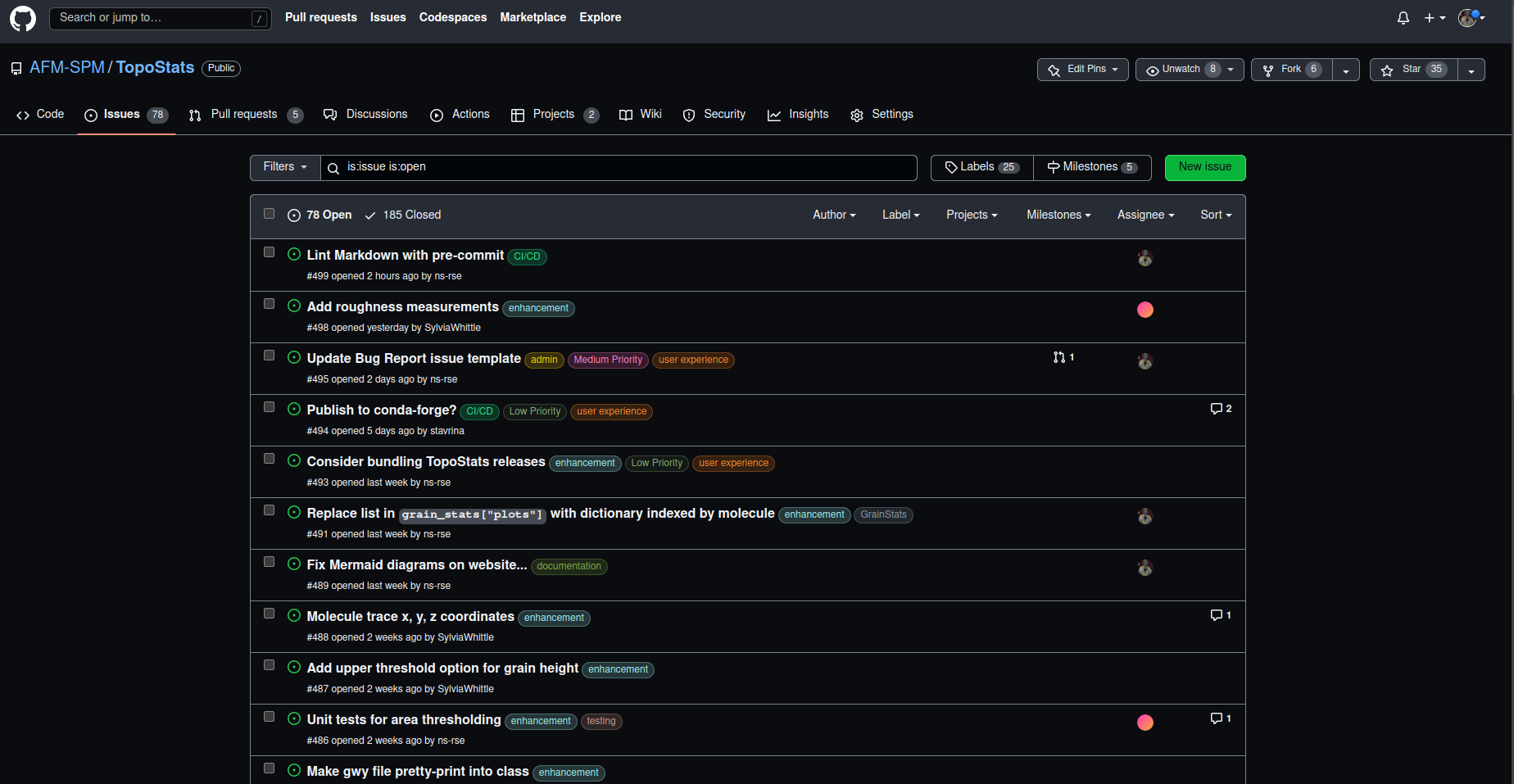
  • Reporting bugs helps with feature development.
  • Removes them not just for you but for all users.
  • Can seem cumbersome at first but it gets easier with practice.

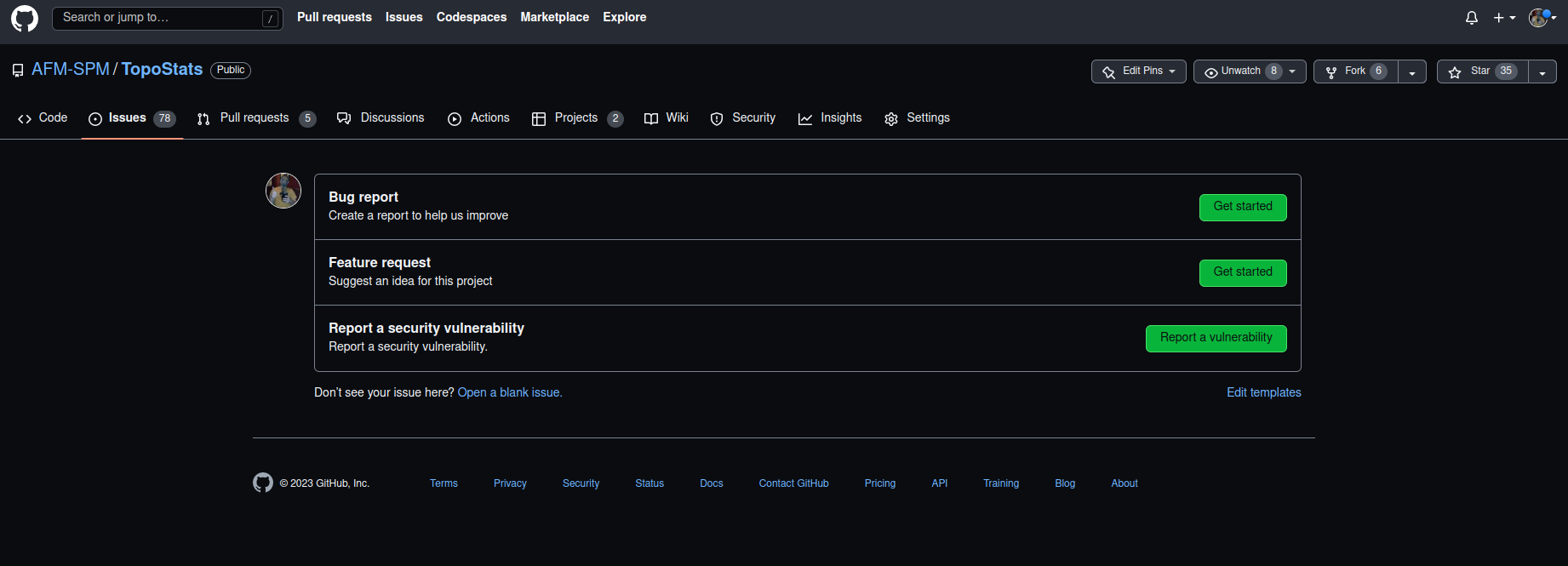
SOLUTION : GitHub Issues…https://github.com/AFM-SPM/TopoStats/issues

GitHub - Reporting Issues

GitHub - Reporting Issues (cont.)

Markdown Links

GitHub - Reporting Issues (cont.)

  • Describe the bug.
  • Include the configuration file.
  • Copy of the output.
  • Exact command that failed.
  • TopoStats version
  • Operating System and Python Version
  • Optional Python packages that are installed.

Exercise 1 - Tests

  1. Create a new Conda environment called test.
  2. Checkout topostats-test branch.
  3. Install TopoStats and include the test dependencies.
  4. Run the test suite with pytest

Exercise 1 - Tests (Solution)

conda create --name test python=3.10
git checkout topostats-test # This is the commandline version, use GitKraken to switch
pip install -e .[tests]  # Install the test dependencies as well
pytest

Exercise 2 - Surprise

  1. Create a new Conda environment called surprise.
  2. Checkout topostats-surprise branch.
  3. Install TopoStats.
  4. Try running pytest.
  5. Run TopoStats.

Exercise - 2 Surprise (Solution)

conda create --name surprise python=3.10
git checkout topostats-surprise # This is the commandline version, use GitKraken to switch
pip install -e .  # Install the test dependencies as well
pytest
run_topostats
      ___           ___           ___           ___
     /\  \         /\  \         /\  \         /\  \
     \:\  \       /::\  \       /::\  \       /::\  \
      \:\  \     /:/\:\  \     /:/\:\  \     /:/\:\  \
      /::\  \   /:/  \:\  \   /::\~\:\  \   /:/  \:\  \
     /:/\:\__\ /:/__/ \:\__\ /:/\:\ \:\__\ /:/__/ \:\__\
    /:/  \/__/ \:\  \ /:/  / \/__\:\/:/  / \:\  \ /:/  /
   /:/  /       \:\  /:/  /       \::/  /   \:\  /:/  /
   \/__/         \:\/:/  /         \/__/     \:\/:/  /
                  \::/  /                     \::/  /
                   \/__/                       \/__/
      ___           ___           ___           ___           ___
     /\  \         /\  \         /\  \         /\  \         /\  \
    /::\  \        \:\  \       /::\  \        \:\  \       /::\  \
   /:/\ \  \        \:\  \     /:/\:\  \        \:\  \     /:/\ \  \
  _\:\~\ \  \       /::\  \   /::\~\:\  \       /::\  \   _\:\~\ \  \
 /\ \:\ \ \__\     /:/\:\__\ /:/\:\ \:\__\     /:/\:\__\ /\ \:\ \ \__\
 \:\ \:\ \/__/    /:/  \/__/ \/__\:\/:/  /    /:/  \/__/ \:\ \:\ \/__/
  \:\ \:\__\     /:/  /           \::/  /    /:/  /       \:\ \:\__\
   \:\/:/  /     \/__/            /:/  /     \/__/         \:\/:/  /
    \::/  /                      /:/  /                     \::/  /
     \/__/                       \/__/                       \/__/

....................................................................................................
....................................................................................................
....................................................................................................
....................................................................................................
....................................,,,,,,,,,,,,,,,,,.,,,,,,,,,,,,..................................
....................................,Y$$$Y$,$$YYYY$$$,$YY$$$$$$Y$Y,.................................
.......,YYY$+DDDDDDDJJDDDDDDDDDDDDDDDDDDDDDDDDDDDDDDDDDDDDDDDDDDDDDDDDDDDDDDDDDDDDDDDDDDDD$.........
........,,,.*@@@@@@@J%%*@@@@@@@@@@@@@@@@@@@@@@@@@@@@@@@@@@@@@@@@@@@@@@@@@@@@@@@@@@@@@@@@@@$.........
............P@@@@@JDD@@*D@@@@@@@@@@@@@@@@@@@@@@@@@@@@@@@@@@@@@@@@@@@@@@@@@@@@@@@@@@@@@@@@@$.........
............P@@@@JPJ@JD%@@@@@@@@@@@@@@@@@@@@@@@@@@@@@@@@@@@@@@@@@@@@@@@@@@@@@@@@@@@@@@@@@@$.........
............P@@@DD%*PPD@@@@@@@@@@@@@@@@@@@@@@@@@@@@@@@@@@@@@@@@@@@@@@@@@@@@@@@@@@@@@@@@@@@$.........
............P@@P%%DDD@@@@@@@@@@@@@@@@@@@@@@@@@@@@@@@@@@@@@@@@@@@@@@@@@@@@@@@@@@@@@@@@@@@@@$.........
............P@@%DD@@@@@@@@@@@@@@@@@@@@@@@@@@@@@@@@@@@@@@@@@@@@@@@@@@@@@@@J@@@@@@@@@@@@@@@@$.........
............*J%PY%+@@@@@@@@@@@@@@@@@@@@@@@@@@@@@@@@@@@@@@@@@@@@@@@@@@@@@PYD@@@@@@@@@@@@@@@$.........
........$$$,***PDDD@@@@@@@@@@@@@@@@@@@@@@@@@@@@@@@@@@@@@@@@@@@@@@@@@@@@YYD@@@@@@@@@@@@@@@@$.........
........$$$,P@J@@@@@@@@@@@@@@@@@@@@@@@@@@@@@@@@@@@@@@@@@@@@@@@@@@@@@@@@%P*P@@@@@@@@@@@@@@@$.........
............P@@@@@@@@@@@@@@@@@@@@@@@@@@@@@@@@@@@@@@@@@@@@@@@@@@@@@@@@@@@@@@@@@@@@@@@@@@@@@$.........
............P@@@@@@@@@@@@@@@@@@@@@@@@@@@@@@@@@@@JD*J@@@@@@@@@@@@@@@@@@@@@@@@@@@@@@@@@@@@@@$.........
............P@@@@@@@@@@@@@@@@@@@@@@@@@@@@@@@%**DD*P@@@@@@@@@@@@@@@@@@@@@@@@@@@@@@@@@@@@@@@$.........
............P@@@@@@@@@@@@@@@@@@@@@@@@@@@@@@@%%DJD%@@@@@@@@@@@@@@@@@@@@@@@@@@@@@@@@@@@@@@@@$.........
............P@@@@@@@@@@@@@@@@@@@@@@@@@@@@@@@@@@@@@@@@@@@@@@@@@@@@@@@@@@@@@@@@@@@@@@@@@@@@@$.........
........,,,,P@@@@@@@@@@@@@@@@@@@@@@@@@@@@@@@@@@@@@@@@@@@@D%@@@@J+%@@@@@@@@@@@@@@@@@@@@@@@@$.........
........$YY$P@@@@@@@@@@@@@@@@@@@@@@@@@@@@@@@@@@@@@@@@@@@JYD*D@@J+$J@@@@@@@@@P+PJ@@@@@@@@@@$.........
.....$$.....P@@@@@@@@@@@@@@@@@@@@@@@@@@@@+PJ@@@@@@@@@@@J*D@JP@@@@D$*D@@@@@@@@D,%@@@@@@@@@@$.........
.....Y$.....P@@@@@@@@@@@@@@@@@@@@@@@@@@J%*JP@@@@@@@@@@@**DJJ@@@@@@D**@@@@@@@@J+P@@@@@@@@@@$.........
.....Y$.....P@@@@@@@@@@@@@@@@@@@@@@@@@JPJ@%*@@@@@@@@@@@@@@@@@@@@@@@@@@@@@@@@@@%%@@@@@@@@@@$.........
.....Y$.....P@@@@@@@@@@@@@@@@@@@@@@@@@@*%P%@@@@@@@@@@@@@@@@@@@@@@@@@@@@@@D*J@@@@@@@@@@@@@@$.........
.....Y$.....P@@@@@@@@@@@@@@@@@@@@@@@@@@@@@@@@@@@@@@@@@@@@@@@@@@@@@@@@@J@JYPP@@@@@@@@@@@@@@$.........
.....Y$.....P@@@@@@@@@@@@@@@@@@@@@@@@@@@@@@@@@@@@@@@@@@@@@@@@@@@@@@@@P*+Y*D@@@D%D@@@@@@@@@$.........
.....YY.....P@@@@@@@@@@@@@@@@@@@J@@@@@@@@@@@@@@@@@@@@@@@@@@@@@@@@@@@@J%%@@@@J*$%%P@@@@@@@@$.........
.....,,.$$$,P@@@@@@@@@@@@@@@@DD*,D@@@@@@@@@@@@@@@@@@@@@@@@@@@@@@@@@@@@@@@@@@+P*D%J@@@@@@@@$.........
........,,,,P@@@@@@@@@@@@@@@P%%YD@@@@@@@@@@@@@@@@@@@@@@@@@@@@@@@@@@@@@@@@@@@JD@@@@@@@@@@@@$.........
............P@@@@@@@@@@@@@@@+JPJ@@@@@@@@@@@@@@@@@@@@@@@@@@@@@@@@@@@@@@@@@@@@@@@@@@@@@@@@@@$.........
............P@@@@@@@@@@@@@@@%*J@@@@@@@@@@@@@@@@@@@@@@@@@@@@@@@@@@@@@@@@@@@@@@@@@@@@@@@@@@@$.........
............P@@@@@@@@@@@@@@@@@@@@@@@@@@@@@@@@@@@@@@@@@@@@@@@@@@@@@@@@@@@@@@@@@@@@@@@@@@@@@$.........
............P@@@@%J@@D*+%@@@@@@@@@@@@@@@@@@@@@@@@%%%J@@@@@@@@@@@@@@@@@@%**%@@@@@@@@@@@@@@@$.........
............P@@@@P+Y+P%*J@@@@@@@@@@@@@@@@@@@@@@@@%PDPJ@@D@@@@@@@@@@@@@+%JDP+%@@@@@@@@@@@@@$.........
............P@@@@@@@@@@@@@@@@@@@@@@@@@@@@@@@@@@@@@%%*J@@+%%DJ@@@@@@@@@%D%DJDD@@@@@@@@@@@@@$.........
........,,,,P@@@@@@@@@@@@@@@@@@@@@@@@@@@@@@@@@@@@@***%@@%D@J+J@@@@@@@@@@@@@@@@@@@@@@@@@@@@$.........
........$$$$P@@@@@@@@@@@@@@@@@@@@@@@@@@@@@@@D%%*@@@DD@@@D*J**@@@@@@@D%DJJ*%@@@@@@@@****%@@$.........
............P@@@@@@@@@@@@@@@@@@@@@@@@@@@@@@%PPP%@@@@@@@@@JDD@@@@@@@J+@JD%P*@@@@@%+PP%%%*@@$.........
............P@@@@@@@@@@@@@@@@@@@@@@@@@@@@@@DP*@@@@@@@@@@@@@@@@@@@@@@%*DD%%@@@@@@@DD@@@@@@@$.........
............P@@@@@@@@@@@@@@@@@@@@@@@@@@@@@@D$J@@@@@@@@@@@@@@@@@@@@@@@@@@@@D*%%PJJ+%%*@@@@@$.........
............P@@@@@@@@@@%PD@@@@@@@@@@@@@@@@@@J@@@@@@@@@@@@@@@@@@@@@@@@@@@@@+D@DPJ@D%D*Y%@@@$.........
............P@@@@@@@@@@D+$D@@@@@@@@@@@@@@@@@@@@@@@@@@@@@@@@@@@@@@@@@@@@@@@J+J+@@@@@@@%+D@@$.........
............*J*D@@@@@@@@@P**P@@@@@@@@@@@@@@@@@@@@@@@@@@@@@@@@@@@@@@@@@@@@@@D+D@@@@@@@@@@@@$.........
............*J*YPP%**@@@@@D%D@@@@@@@@@@@@@@@@@@@@@@@@@@@@@@@@@@@@@@@@@@@@@@@@@@@@@@@@@@@@@$.........
..........,$PJJJ%P*P%JJJJJJJJJJJJJJJJJJJJJJJJJJJJJJJJJJJJJJJJJJJJJJJJJJJJJJJJJJJJJJJJJJJJJ$.........
..........,,Y,,,,,,,,,,,,,$$Y$,,,,,,,,,,,$YYY,,,,,,,,,,,,YYY,,,,,,,,,,,,YYY$,,,,,,,,,,,$YY$.........
............,.............,,,,...........,,,,,.......,..,,,,............,,,,...........,,,,.........
.............................................YYY$$$$YY$$$,..........................................
....................................................................................................
....................................................................................................
....................................................................................................
  ____                            _         _       _   _                 _ _
 / ___|___  _ __   __ _ _ __ __ _| |_ _   _| | __ _| |_(_) ___  _ __  ___| | |
| |   / _ \| '_ \ / _` | '__/ _` | __| | | | |/ _` | __| |/ _ \| '_ \/ __| | |
| |__| (_) | | | | (_| | | | (_| | |_| |_| | | (_| | |_| | (_) | | | \__ \_|_|
 \____\___/|_| |_|\__, |_|  \__,_|\__|\__,_|_|\__,_|\__|_|\___/|_| |_|___(_|_)
                  |___/

Exercise 3 - Notebooks

  1. Create a new Conda environment called notebooks.
  2. Checkout ns-rse/504-plotting-arrays branch.
  3. Install TopoStats with notebooks dependencies.
  4. Run TopoStats.
  5. Start a Notebook

Exercise 3 - Notebooks (Solution)

conda create --name test python=3.10
git checkout topostats-test # This is the commandline version, use GitKraken to switch
pip install -e .[tests]  # Install the test dependencies as well
jupyter notebook

Jupyter Notebooks

  • Interactive execution of Python Code.
  • Early development.
  • Walk-through for running TopoStats (00-Walthrough-minicircle.ipynb)
  • Summary Statistics and Plotting (02-Summary-statistics-and-plots.ipynb)
  • Plotting Scans (03-Plotting-scans.ipynb)
  • Try going through them to process images (some require run_topostats) to have been run.
Any Questions?